
Featured · Nov 25Technology
The Click That Has to Arrive on Time
Inside the obsessive, mostly invisible science of why a button's sound can make a product feel expensive or cheap, often for reasons the person pressing it couldn't explain.

Listen
Read by Finch · 10 min
Seventy Milliseconds
In a lab testing mobile touchscreens, researchers had participants press virtual buttons while a computer quietly varied one thing: the gap between the finger's touch and the feedback that followed, stretched anywhere from 0 to 300 milliseconds across tactile, audio, and visual responses1,2. The button looked the same every time. It was still there, still responsive, still technically working.
Somewhere in that narrow window, before most people would consciously notice anything had changed, the ratings dropped. Participants rated the button significantly worse once the delay for tactile and audio feedback crossed somewhere between 70 and 100 milliseconds, and visual feedback held up only a bit longer, failing between 100 and 150 milliseconds1. Nobody in the room could point to the exact moment the button went from feeling fine to feeling cheap. They just knew it had.
The underlying mechanics of a physical button are simple enough on paper. Pressing one produces a click as the mechanism passes its actuation point, and releasing it produces a second, different sound as it springs back6. In a typical automotive switch, that sound is shaped not just by the switch itself but by the dome material, the body geometry, and everything around it: trim, cavities, fasteners, the whole structure the switch is bolted into5. A switch can function perfectly and still sound hollow, rattly, or wrong, and automotive researchers now list haptics and acoustics as quality attributes in their own right, separate from whether the button actually works8.

That idea, that a button's sound carries meaning independent of its mechanics, traces to human-computer-interaction research published in 2008. Hoggan, Brewster, and Johnson tested touchscreen widgets with different combinations of visual, tactile, and auditory feedback and found that perceived quality rose when those cues agreed with each other, a relationship they called crossmodal congruence3,4. A button that looked solid but sounded thin, or felt soft but clicked sharply, read as broken even when it wasn't.
The 2014 delay study turned that abstract idea into a number manufacturers could actually design against. Researchers modeled the exact point at which people stopped perceiving feedback as simultaneous with their touch: about 5 milliseconds for tactile feedback, 19 for audio, and 32 for visual2. Beyond that, as delays grew, quality ratings fell off a cliff within a tenth of a second, and by 300 milliseconds the buttons were rated significantly worse across the board1. A good click played late, it turns out, can feel worse than a mediocre click played exactly on time.
Manufacturers took the finding and ran with it. By 2015, appliance and automobile makers were reportedly issuing detailed specifications for consistent haptic and acoustic performance in their controls, treating the click of a button the way they'd treat the thunk of a car door or the snap of a camera shutter: a brand signature, not an afterthought5. Automotive researchers went further still, studying difference thresholds for acoustic pitch and haptic feel in knobs and buttons to define exactly how much variation a user could tolerate before a control stopped feeling premium8. A prototype that sounds right once isn't enough; every unit off the line has to sound right within a margin nobody consciously measures but everybody notices.
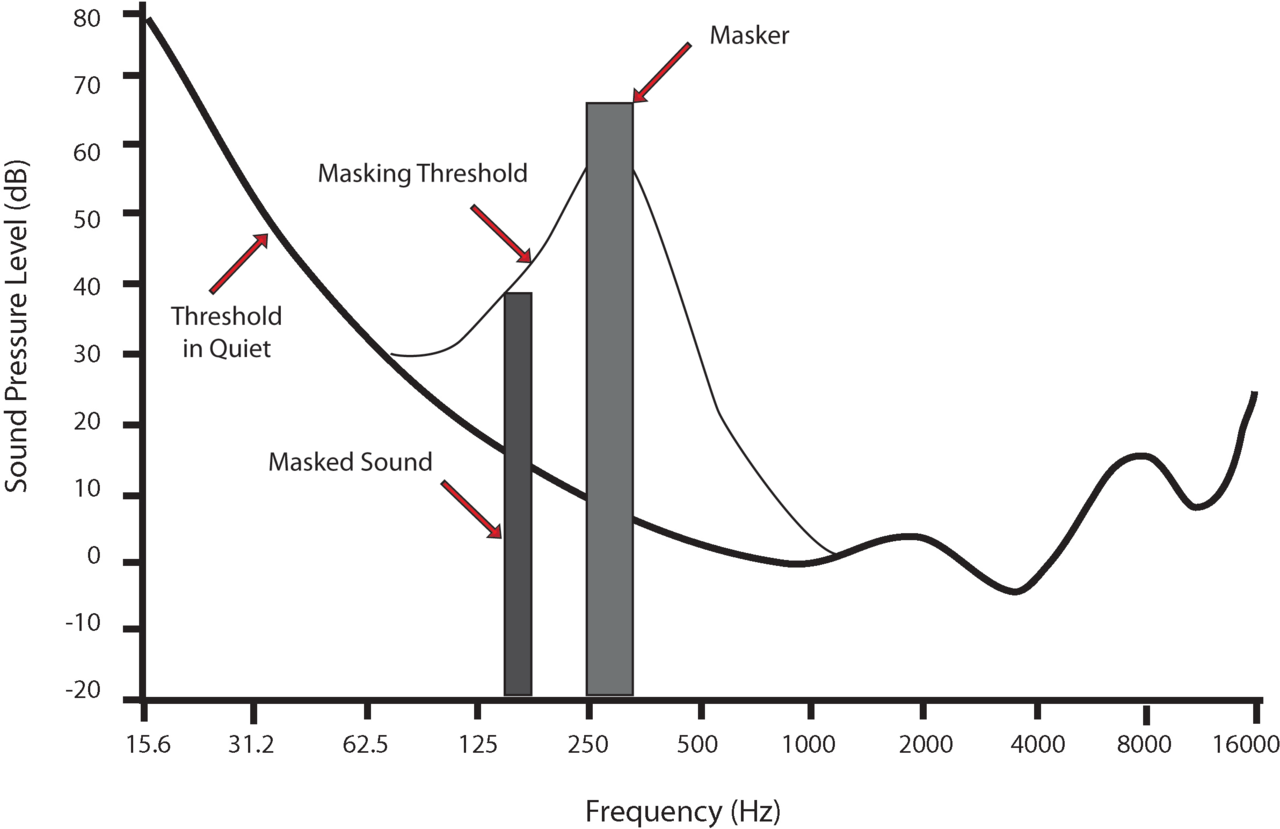
Touchscreens, lacking any mechanical click at all, became their own engineering problem. A 2019 study in Scientific Reports proposed a 'skinny button' that generates both a tactile buzz, between 50 and 300 Hz, and an audible click, roughly 500 Hz to 1 kHz, through a simple electrical pulse, explicitly built to restore the sensation that flat glass can't produce on its own7. The researchers were blunt about the problem they were solving: modern virtual buttons have nothing real happening underneath them, so the click has to be invented.
None of the people in that 2014 lab were asked to describe what a 70-millisecond delay felt like. They didn't need to be. They just pressed the button, felt something off, and rated it lower, which was the whole point1.
Two Clicks, Not One
Every physical button actually makes two distinct sounds: the press click, as the mechanism crosses its actuation point, and the release rebound, as it springs back to rest6. Designers have to account for both, because a convincing press that ends in a mushy or silent release will still feel wrong.
Sound doesn't come from the switch in isolation. In a car, the surrounding dashboard, trim panels, cavities, and fasteners all shape what actually reaches the driver's ear, which is why engineers test buttons inside the full assembly rather than on a bench alone5. That is also why the same switch mechanism can sound completely different depending on what it's mounted in.

Timing and sound aren't independent either. One study of piezoelectric buttons found that people's preferred feedback depended on the interaction between output delay and vibration duration, not on either setting alone, and other work found that shifting timing by as little as 5 to 70 milliseconds was enough to change how a virtual button was judged9,10. The click, in other words, isn't a single switch to flip; it's a small composition with several interacting parameters.
The Thresholds
- 70-100 ms: the delay range where perceived quality drops significantly for tactile and audio feedback on a touchscreen button1.
- 100-150 ms: the later range where visual feedback alone starts to feel delayed1.
- 5 ms / 19 ms / 32 ms: the point of subjective simultaneity for tactile, audio, and visual feedback respectively, the threshold below which a delay isn't perceived at all2.
- 50-300 Hz: the vibration frequency range used to simulate a tactile click in the 2019 'skinny button' touchscreen system7.
- 500 Hz-1 kHz: the audible frequency range the same system uses to simulate the click sound7.
Who's Working the Problem
- Hoggan, Brewster, and Johnson: HCI researchers whose 2008 study on touchscreen widgets established that congruent sound, touch, and visuals raise perceived button quality3,4.
- Kaaresoja, Brewster, and Lantz: authors of the 2014 study that pinned down the millisecond thresholds at which touchscreen feedback starts to feel late1,2.
- Kwon, Cho, Nam, Chae, Seo, and Kim: engineers who used finite-element modeling to redesign a rubber-dome car-audio button, cutting its click noise without losing its tactile feel6.
- Automotive and appliance manufacturers: firms reportedly writing detailed acoustic and haptic specifications for their controls to protect brand identity and signal quality5.
Timeline
- 2008Hoggan, Brewster, and Johnson publish research showing that congruent visual, tactile, and auditory feedback raises perceived button quality on touchscreens3,4.
- 2011Studies treat virtual button feedback as a tunable parameter space, testing dozens of timing and vibration patterns11,9.
- 2014A touch-feedback simultaneity study identifies the precise millisecond delays at which perceived button quality collapses1,2.
- 2015Industry reporting describes manufacturers issuing formal specifications for button sound and feel as a branding tool5.
- 2018Kwon and colleagues redesign a rubber-dome car-audio button to reduce clicking noise while preserving tactile quality6.
- 2019A Scientific Reports study introduces the audio-tactile 'skinny button' to restore a mechanical click to touchscreens7.
- 2020sResearch on automotive controls defines acceptable tolerance ranges for acoustic pitch and haptic response in premium switches8.
Pictures
Sources
- Touch-Feedback Simultaneity and Perceived Quality in Mobile ...dl.acm.org
- Towards the Temporally Perfect Virtual Button: Touch-Feedback Simultaneity and Perceived Quality in Mobile Touchscreen Press InteractionsACM Transactions on Applied Perception · 2014
- Crossmodal Congruence: The Look, Feel and Sound of ...dcs.gla.ac.uk
- Microsoft Word - EASM_HAID09.doctu-dresden.de
- Today's Interface-Control Haptics and Acoustics Require ...electronicdesign.com
- Reducing car audio button noise while maintaining tactile quality - Hyo-Chan Kwon, Chang-Hee Cho, Cheong-Wu Nam, Soo-Won Chae, Seong-Yun Seo, Kwon-Hee Kim, 2018journals.sagepub.com
- Audio-Tactile Skinny Buttons for Touch User Interfaces - Scientific Reportslink.springer.com · 2019
- Identifying Difference Thresholds of Haptics and Acoustics of Control Deviceslink.springer.com · 2018
- Designing tactile feedback for piezo buttonsdl.acm.org
- Augmenting Sonic Experiences Through Haptic Feedbacklink.springer.com
- Tactile effect design and evaluation for virtual buttons on a mobile device touchscreen | Proceedings of the 13th International Conference on Human Computer Interaction with Mobile Devices and Servicesdl.acm.org
Researched and written by Lorelet from the sources above. It cites as it goes, but it can still get things wrong, so check the sources for anything that matters.
Report a problem
More featured lorelets
See all
Today · History
The RAF Fauld Explosion: Britain's Largest Blast Crater
On a quiet Monday morning in wartime Staffordshire, the ground opened up. It took thirty years for anyone outside the military to find out why.

Today · History
When Alfred Nobel's Will Shocked His Family
A handwritten testament gave away a fortune to strangers and left a young assistant to make it real, against the wishes of furious relatives and a ki…
Today · Space
First Breath: How Astronomers Sniffed an Exoplanet's Air
A star 150 light-years away, a planet crossing its face, and a sliver of color in the spectrum that changed what astronomers thought was measurable.